
How do I pay off my rental properties as fast as possible?
If you read landlord forums you have seen this question a hundred times, usually from someone two or three properties in: how do I pay these off as fast as I can? The replies are always the same fight. Half say never pay off a cheap mortgage, buy more doors. The other half say they sleep better owning things outright. Both halves skip the part that actually matters, which is that until you can see every loan you have on one screen, with the balance today and what one extra dollar does to each of them, you are not making a decision. You are guessing.
I am not going to tell you whether to pay down or buy more. That depends on your rates, your reserves, your age and your tolerance for leverage, and it is a conversation for you and your accountant. What I can show you is the mechanical part I use, because it is the same whichever side you land on: the loans entered once, the extra payment tested before it is committed, the whole portfolio in one payoff schedule, and a record of what I actually paid each month so the plan does not drift into fiction.
The screenshots below are the demo account, with two made-up loans on two made-up buildings. The numbers are ordinary Pennsylvania duplex numbers so the math reads true.
How it goes, loan by loan
1Enter each loan once, and the balance keeps itself
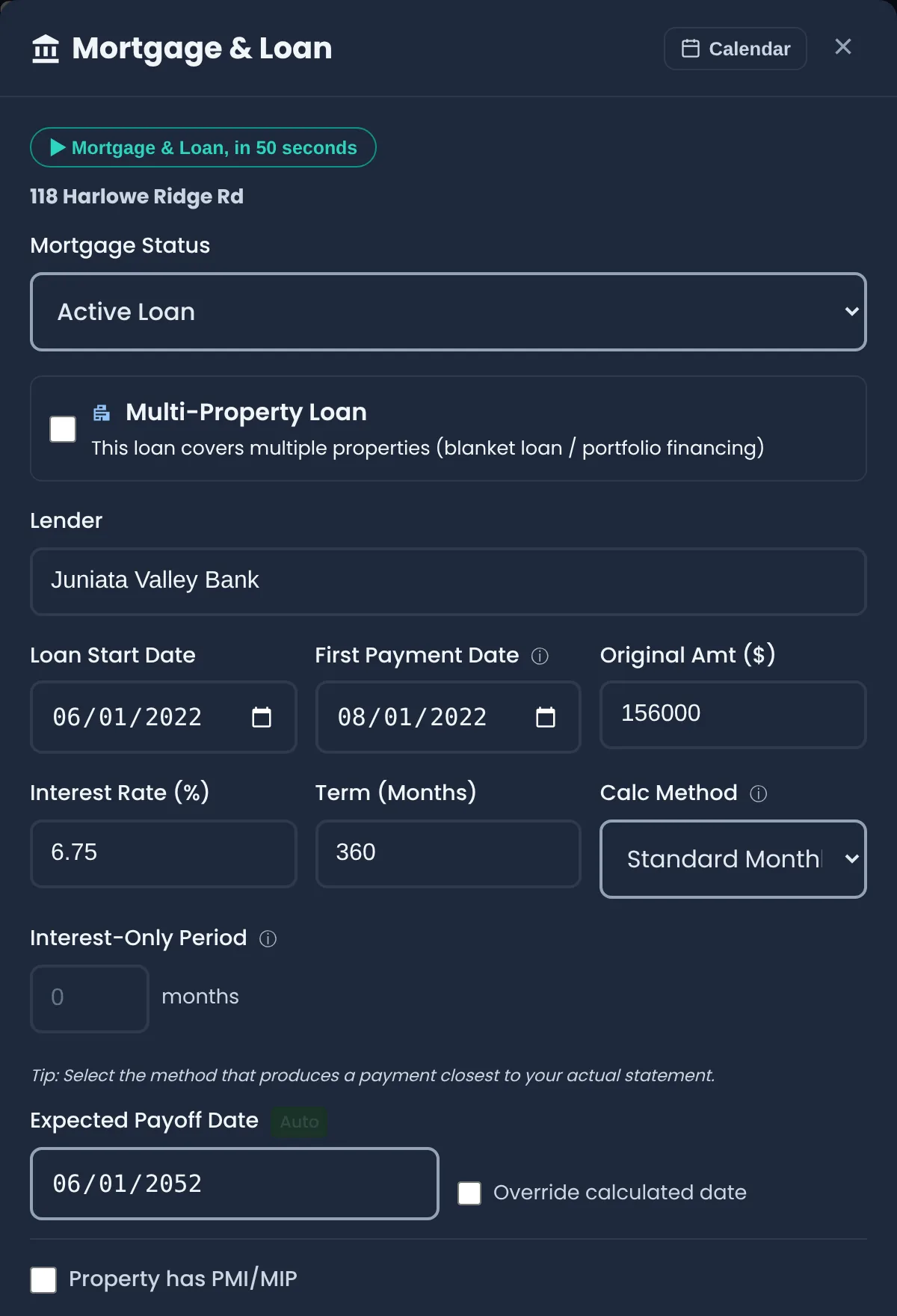
The first time I tried to answer the payoff question for myself I had three statements open in three browser tabs and a spreadsheet that was wrong by the second month. The fix was to stop tracking balances by hand. I enter the loan the way the closing papers describe it: lender, the day it started, the original amount, the rate, the term. The monthly principal and interest comes out of that, and so does the number of payments I have made since, and so does the balance as of today. I never type a balance again unless a statement shows something unusual, in which case there is an override and the app recalculates from there.
Equity is the other half of the same entry. The property card shows the value I set against the amount still owed, so I can see in one glance which building I actually own and which one the bank mostly owns. That picture matters later when it is time to decide where the extra money goes.
2Test what one extra payment does before committing to it
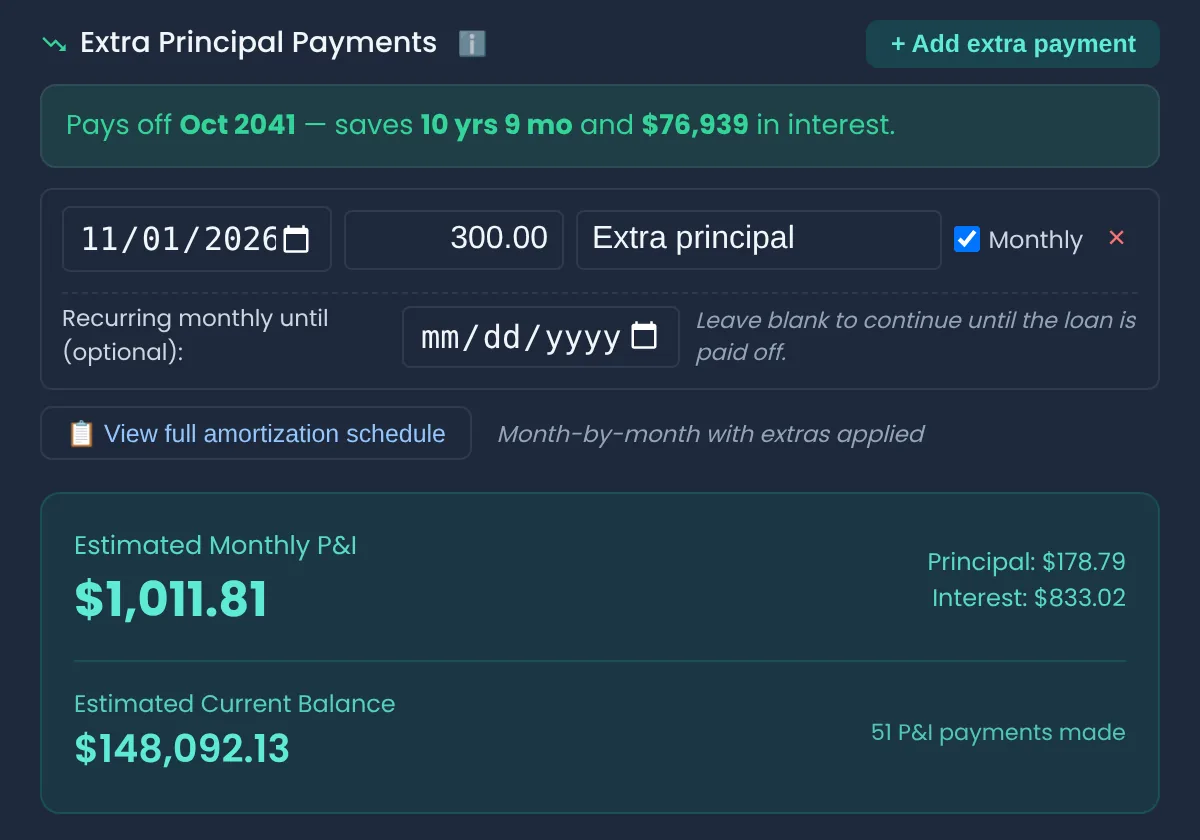
Before I decide anything across the portfolio I like to see the effect on one loan, because the numbers are counterintuitive until you have watched them. An extra few hundred dollars a month on a thirty-year note early in its life takes years off the end of it, and the interest saved is a number that makes you sit up. The same extra payment in year twenty-two barely moves anything. The only way to know which case you are in is to run it on the real loan.
So I add the extra payment here, tick it as monthly, and read the banner: how much sooner the loan ends and how much interest never gets paid. If I want to see the mechanics I open the amortization schedule and watch the principal portion grow month by month. Nothing is sent to the bank from this screen. It is a plan. The payment itself still goes through the lender like any other, marked for principal.
3Every debt on one screen
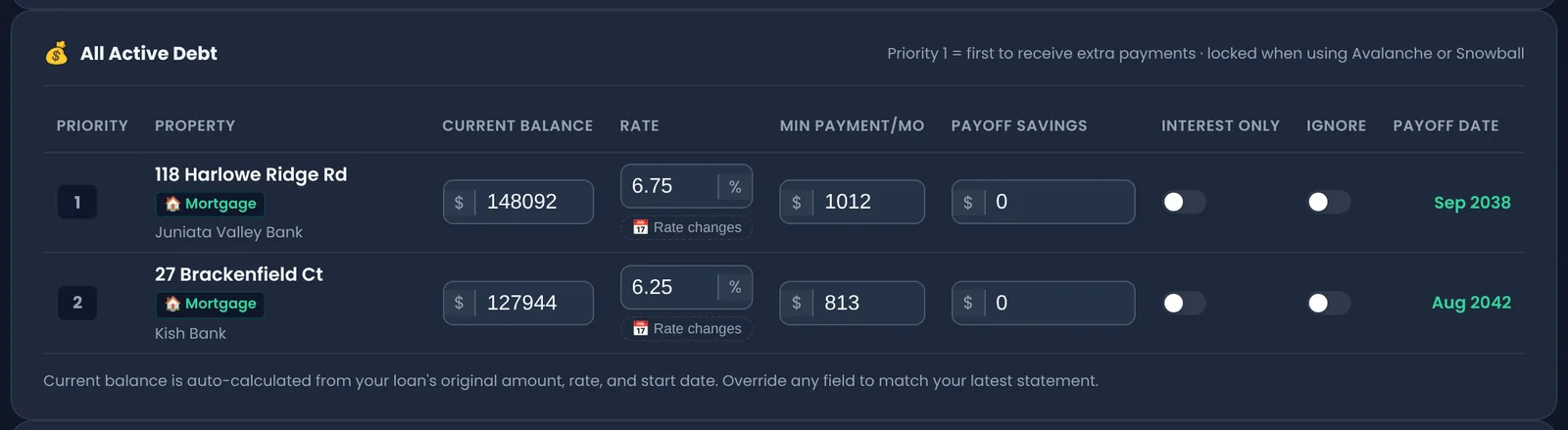
This is the screen the forum thread is really asking for. Every loan I have, mortgages and otherwise, on one page: the balance today, the rate, the minimum payment and the month each one dies if I only ever pay the minimum. Above it, the totals: what I owe altogether, when I would be debt-free paying minimums, when I would be debt-free with the plan, and the interest the plan saves.
The reason this has to include the non-mortgage debt is that a landlord's cheapest-looking decision is often wrong. A 6.75% mortgage feels like the thing to attack until you see the equipment loan or the line of credit sitting next to it at a higher rate. Seeing them in one list, sorted, is most of the answer.
4Avalanche, snowball, or my own order
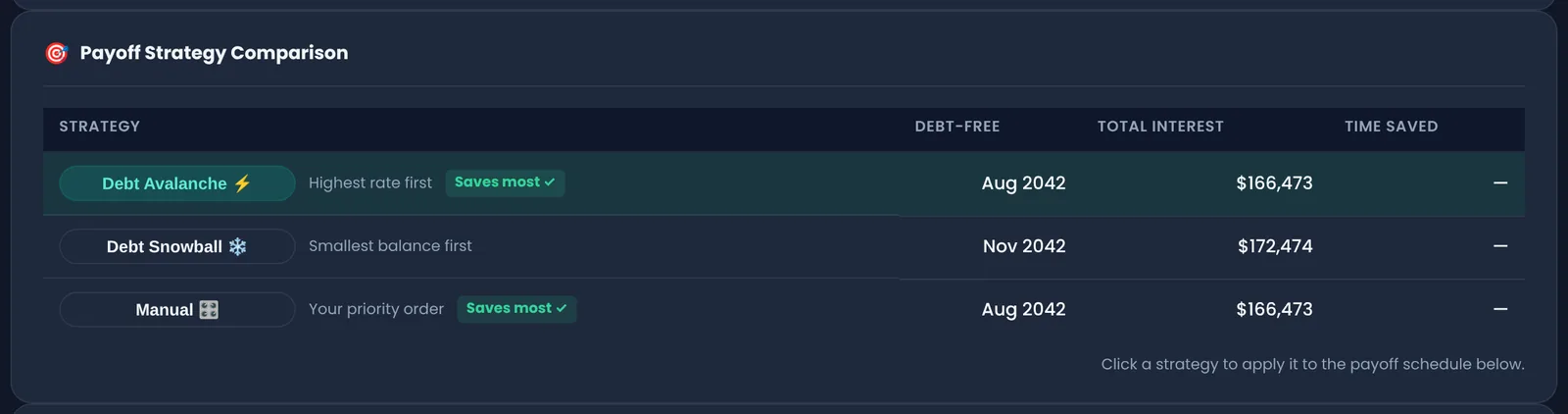
Here is where the forum fight gets settled with arithmetic instead of opinions. I put in the extra amount I can commit every month. The planner then runs the three ways people do this: avalanche, where the extra goes at the highest rate first; snowball, where it goes at the smallest balance first so you get a loan gone quickly and feel it; and manual, where I drag the order myself because sometimes I want a particular building free and clear for reasons that are not about the rate. Each row shows the debt-free month and the total interest paid along the way, and the one that saves the most is marked.
On the two demo loans the avalanche beats the snowball by about six thousand dollars of interest and three months, because the smaller loan is also the cheaper one. On a portfolio with a credit card or a HELOC in the mix the gap is a lot bigger, and this table is where you find that out before you send the first extra dollar.
5The month-by-month schedule, and what I actually paid
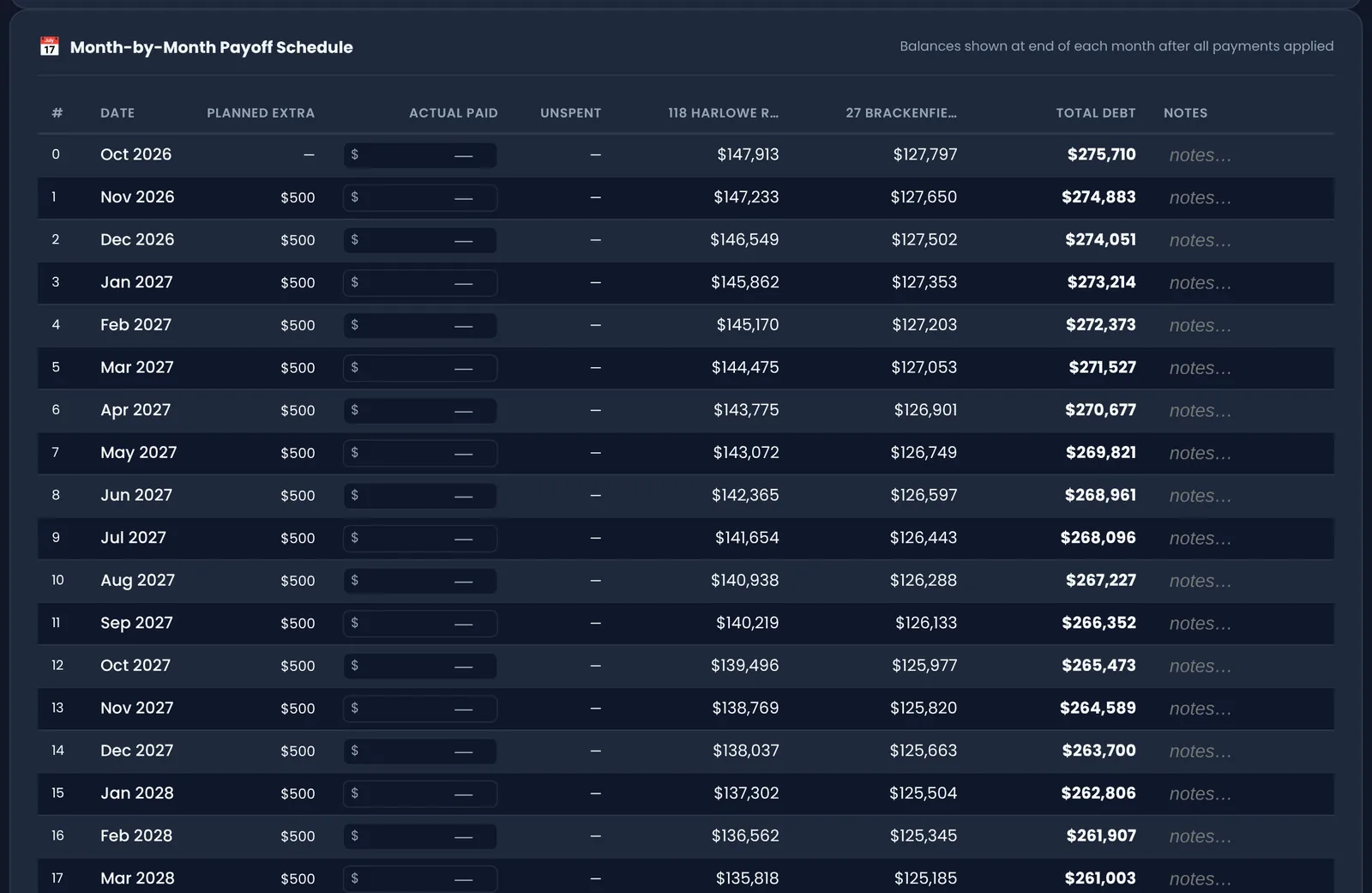
A plan I do not track is a plan I do not follow, so the schedule has a column for what I really paid each month. If a furnace eats the extra payment in February, I type what went out and the schedule reflows from there instead of pretending. When a loan is finished, its old minimum payment rolls onto the next loan in the order without me remembering to do it, which is the whole point of the snowball and the thing people forget to do by hand.
The three scenario slots are for the argument you have with yourself. Scenario one is the aggressive version. Scenario two is the realistic one. Scenario three is what happens if I use the lump sum for a down payment instead. Same loans, three futures, and I can see the debt-free date for each.
6Buying the next one: does it pay for itself, and how fast3 free analyses, then the Starter plan
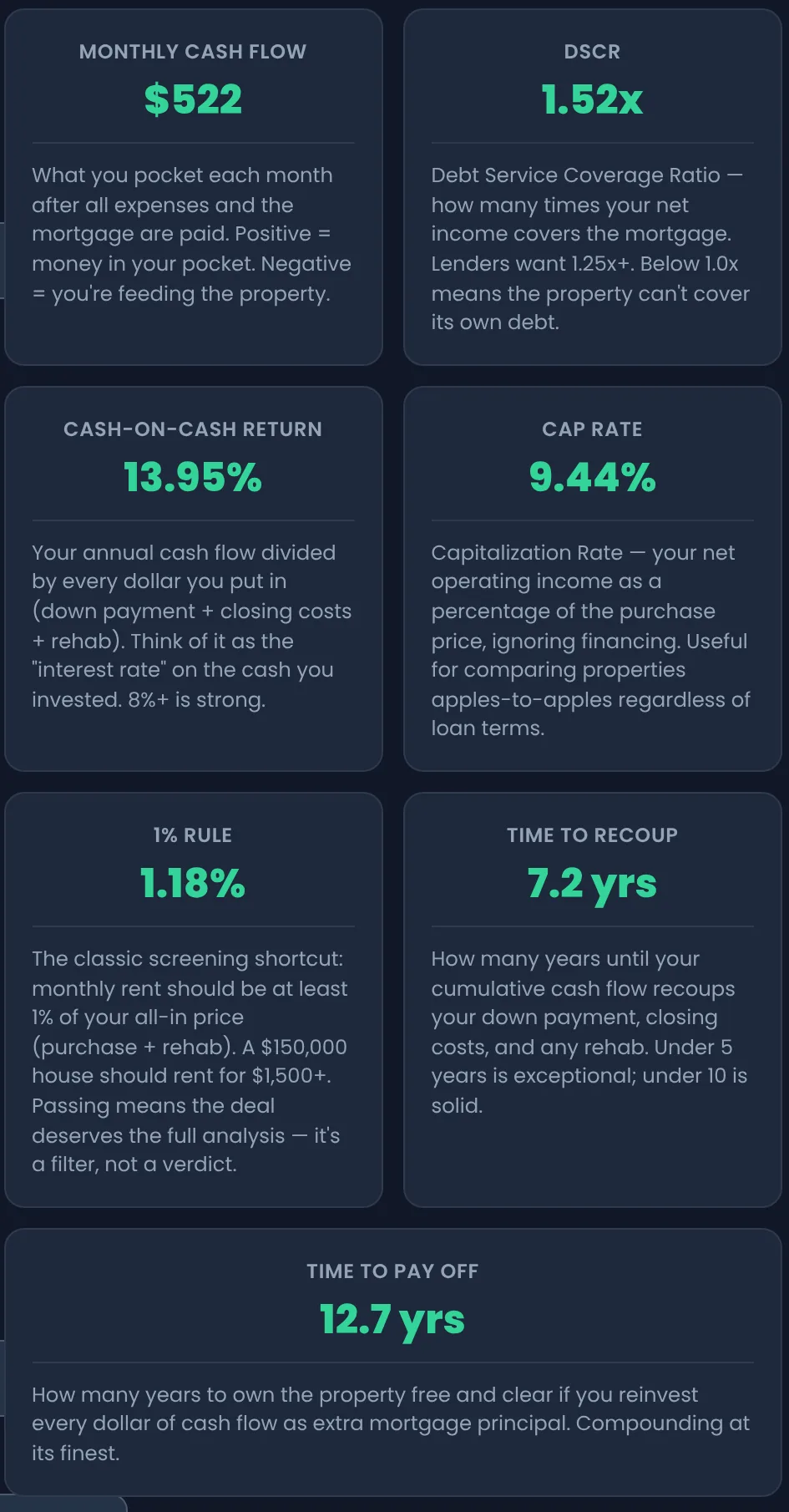
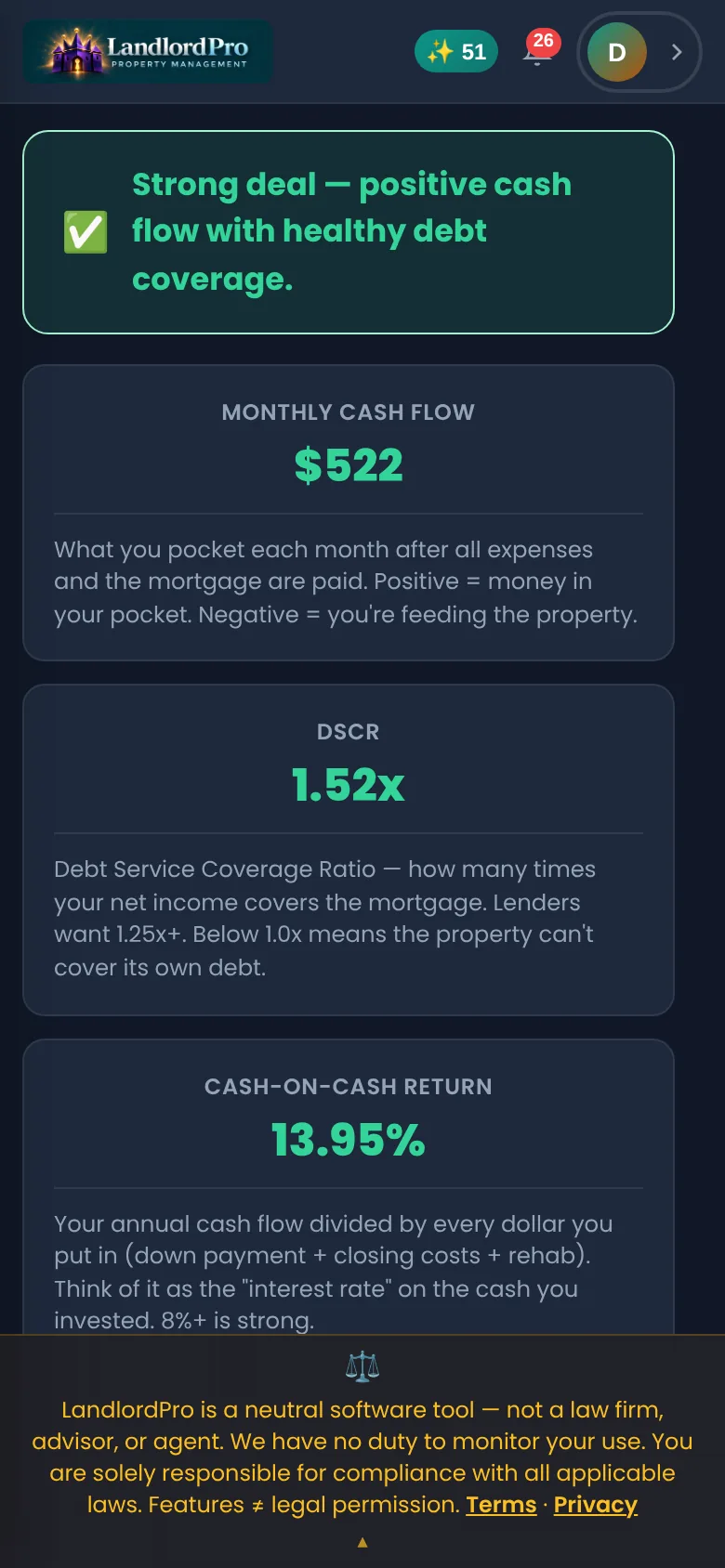
The other half of the forum question is always lurking: should I pay this one down, or buy another? I do not have a universal answer, but I do insist on running the candidate through the same math before I let myself fall in love with it. A duplex at the price and rents in the screenshot clears about five hundred a month after vacancy, maintenance, taxes, insurance and the note. The 1% rule passes, cash-on-cash is strong, and the tile I look at longest says it would pay itself off in under thirteen years if I fed its own cash flow back into the principal.
That last number is the bridge between the two camps. A building that can retire its own mortgage out of its own rent is not really the leverage-versus-safety trade the forum argues about. It is both, in order. Save the analysis, compare it against the next candidate side by side, and print it for the lender.
Why this is worth a page
The payoff question gets asked so often because it is really three questions wearing one coat: what do I owe, what does an extra dollar do, and in what order. A spreadsheet can answer the first on a good day. The planner answers all three, keeps the balances current by itself, and remembers what you actually paid, which is the part that decides whether any of it happens.
None of this is financial advice. I am a landlord, not an advisor, and whether you should pay down or buy more is a question for you and your accountant. The planner just makes sure the numbers you bring to that conversation are the real ones.
The Mortgage Payoff Planner and the mortgage records are on every plan, including free, up to the free plan's 2 properties. The deal analyzer gives three analyses free and is unlimited on the Starter plan.
Questions landlords ask about this
Debt avalanche or debt snowball for rental properties?
Avalanche (highest interest rate first) always pays the least total interest. Snowball (smallest balance first) frees up a payment sooner, which some landlords find easier to stick with, and it is the better choice when the small loan is also the expensive one, like a credit card or equipment loan. On two ordinary mortgages at similar rates the difference is small; on a mix of mortgages and short-term debt it is not. LandlordPro's planner shows both, and a manual order, with the debt-free date and total interest for each.
Should I pay off my rental mortgage early or buy another property?
There is no universal answer; it depends on your rate, your reserves, your other debt and how much leverage you are comfortable carrying. A mortgage below current rates is cheap money, and a building that cash-flows can retire its own loan out of its rent. Run both paths with real numbers: the payoff planner for the pay-down case and the deal analyzer for the buy case, which shows how long a new property takes to pay itself off. Then talk to your accountant. LandlordPro is not a financial advisor.
How do I make sure an extra payment goes to principal?
Tell the lender. Most servicers apply an unmarked extra amount to the next month's payment or to escrow unless you specify principal only, either on the payment slip, in the online payment form, or by calling. Check the next statement to confirm the balance dropped by the extra amount. The planner shows what an extra payment should do; the lender's statement shows whether it did.
Are there prepayment penalties on rental property loans?
Sometimes. Conventional residential loans on one-to-four-unit properties usually have none, but commercial loans, DSCR loans and some portfolio loans from local banks do, often for the first three to five years. Read the note or ask the lender before you start sending extra principal. If there is a penalty, the planner's manual order lets you put that loan last.
Does LandlordPro make the mortgage payments?
No. The planner is a plan and a record: it calculates balances, runs the payoff strategies, and tracks what you actually paid each month. The payments themselves go through your lender the way they always have.
Which LandlordPro plan includes the payoff planner?
Every plan, including free. The free plan covers up to 2 properties and 4 units; the planner itself is not restricted. The deal analyzer allows three analyses free and is unlimited from the Starter plan.
Run your rentals the way this page shows
LandlordPro is free for up to 4 units — the rent roll, reminders, notices and the records bundle included. No card to start.
Start free